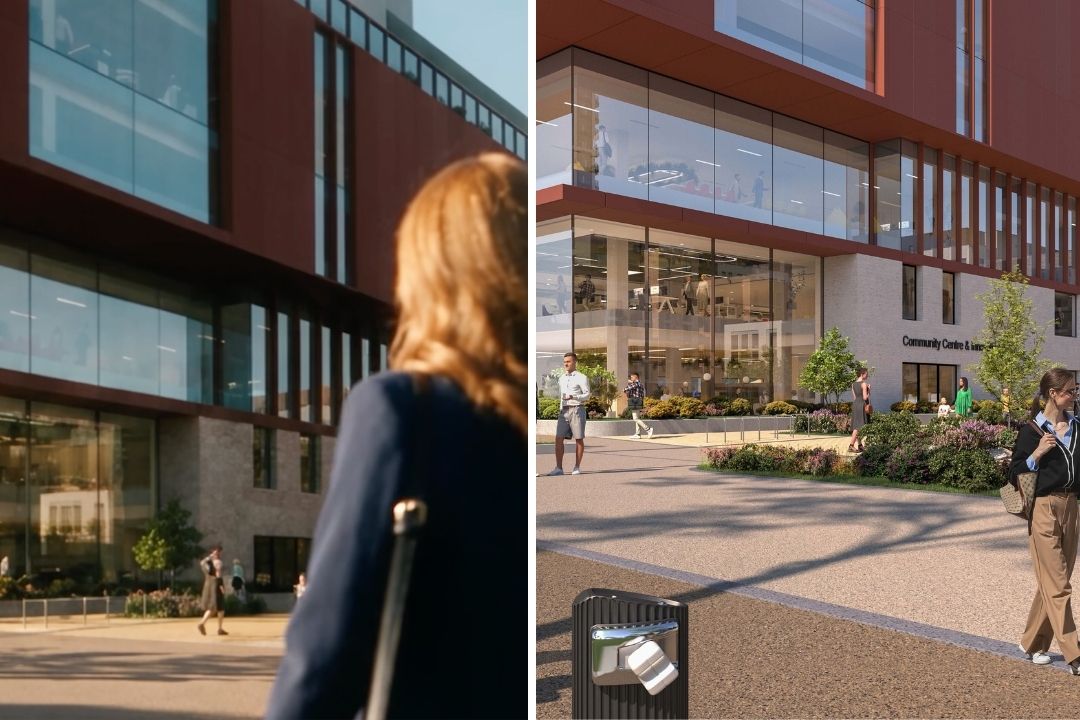
AI-Assisted Real Estate Video for Builders

AI-assisted real estate video turns your renders, CAD or BIM models, or photos into cinematic walkthroughs of a property before it's built. The right method depends on what you're starting with: CAD and BIM files suit photoreal flythroughs, renders and photos suit fast social cuts, and thin capture suits synthetic motion. Every route needs human review and clear AI disclosure.
That's the short answer. Here's how to choose, what the tools actually do, and the rules that decide whether your marketing is legal.
Which approach fits your project?
If you have CAD or BIM files
Best for selling before you build, when you need photoreal, controllable flythroughs.
What matters: CAD and BIM ingest, camera path control, material fidelity, sky and time-of-day settings, and compliance features like watermarking and disclosure toggles. Tools in this space include Luma and a range of CGI-to-video stacks. Most still need real manual passes for material accuracy, lighting, and brand alignment. The clean file gets you 80% there. A human gets you the last 20%, which is the part buyers actually notice.
If you have renders or photos
Best when you need speed, turning static images into social-ready cuts at volume.
What matters: brand kit support, text legibility for lower thirds and CTAs, batch processing, aspect-ratio flexibility, and auto-captions. Quality varies a lot here. Typography breaks. Colour drifts. Batch processing sounds great until you're hand-checking 40-odd variants for the one where the logo went sideways. This is the same "no film crew needed" logic we cover for commercial spaces, applied to housing.
If you have limited capture
Best when you have a few assets and need smooth, drone-like motion.
What to watch: realism versus artifacts, stabilisation, and parallax. Motion tools like AutoReel produce convincing camera moves but warp around complex geometry. Windows, railings, signage, and reflective surfaces are the usual failure points, so vet every room.
Three questions before you start
- Do you have CAD/BIM files, or only renders and photos? This sets your starting point and your tool list.
- Is your priority speed and volume, or cinematic quality? You can push hard on one. Rarely both at once.
- What disclosure rules apply where you're selling? MLS policy, the Fair Housing Act, and ASA/CAP standards aren't optional. More on those below.
At ListLift we run hybrid pipelines: AI for the heavy lifting, skilled humans for the judgment calls. The tools are good. They're still tools. The gap between a render that impresses and one that sells sits in details AI can't see yet.
What "AI-assisted" actually means
Three terms get used loosely. They're worth separating, because the legal risk is different for each.
AI-assisted is a human-directed workflow. AI handles motion, editing, virtual staging, or voiceover. A human sets the creative direction and checks the output.
Fully synthetic means no real capture at all. Everything comes from a prompt or a 3D model. It carries the highest misrepresentation risk if you don't disclose it properly.
Professional capture is traditional filming with a crew. Slower and pricier, still the benchmark for hero content.
Where builders actually use AI-assisted video: pre-construction sales flythroughs of site phases, amenities, and unit types; community and investor updates; and listing microcontent like Reels, TikToks, and leasing videos for multifamily. The use case sets the bar. A 15-second teaser and a 3-minute investor film aren't held to the same standard.
The DIY tool landscape
The market is vendor-led, and most "benchmarks" are marketing in a lab coat. Here's what holds up in production.
Quality tracks your input. CGI-to-video works best with clean BIM or CAD files and a budget for manual material passes. Automated output tends to miss brand colour, reflectivity, and lighting consistency. Photo-to-video is fastest for volume but fights you on text legibility, brand fonts, and grading. Motion tools produce realistic movement and then generate artifacts around the exact things buyers zoom in on.
What to weigh when you pick a tool:
- Quality: motion realism, artifacting, text legibility, brand fidelity.
- Speed: time to first render, and edits to final including QA loops.
- Cost: per duration, resolution, and volume. Pricing models are all over the place.
- Workflow fit: brand kits, batch processing, review and approve loops, revision tracking.
- Compliance: watermark toggles, disclosure features, audit logs.
Your results will depend on asset quality, brand standards, and how tight your QA gates are.
From Revit to reel: a pre-construction pipeline that works
This is the pipeline we run for every project. It's detailed on purpose. Pre-construction video is asset management, brand consistency, and compliance checkpoints, run in order. A prompt and a hope won't get you there. If you're not technical, skim the bold headings and jump to compliance. Your production partner should own this part anyway.
Asset intake and prep. Inputs: Revit or IFC files, SketchUp or Blender models, site plans, elevations, 360° captures, drone topography. Clean the geometry, plan level of detail by scene importance, fix naming conventions, verify units and coordinates, and build material libraries from brand-approved finishes.
Environment and materials. Apply physically-based rendering materials. Get glass and reflections right, because they're the first thing buyers scrutinise. Use vegetation proxies for landscaping, flag hero scenes for extra passes, and set regional lighting. A Dublin project needs a different sky to a Toronto one.
Camera paths. Auto-path tools give you a start. Hand-keyed paths give you control. Run collision and occlusion checks, because nothing breaks the spell like a camera clipping through a wall. Typical beats: approach and arrival, entrance, amenities, unit walkthroughs, views, and a golden-hour hero shot.
Lighting and time of day. Golden hour sells. Night mode shows urban context. Interior-to-exterior transitions show flow. One caution: don't fake the light. If a unit faces north and never gets direct sun, don't bathe it in golden glow. Both the Fair Housing Act and the ASA care about that, and we get to why below.
Render passes and overlays. Generate beauty, ambient occlusion, and depth passes plus masks. Define safe zones for text and lower thirds. Export mezzanine formats for motion compositing, ProRes 422 HQ or OpenEXR depending on the pipeline.
AI motion and b-roll. Add micro-parallax, dolly, and pan. Where you add synthetic lifestyle b-roll, people, pets, activity, disclose it and keep geometry stable. Watch for warping around text and signage.
Voice, music, captions, localisation. Keep a script bank by property type. Choose text-to-speech carefully, or use a human voice for hero content. Build multilingual variants for international buyers, add open captions, and include audio descriptions where accessibility rules require them.
Output and brand consistency. Deliver 16:9 for web, 9:16 for Reels and Stories, 1:1 for feed. Build hooks of 6 to 15 seconds and mid-roll CTAs. Lock brand kits, fonts, colours, LUTs, lower thirds, into templates so nothing drifts across dozens of variants.
Compliance checkpoints. Pre-flight: set watermarks by channel, add CGI disclaimers, run a Fair Housing review of language and imagery. Post-flight: get sign-off from legal and marketing, and export audit logs for MLS submission. This maps to the human review standard we set out in our pillar on AI visualisation.
Compliance and disclosure: the rules you can't skip
This is the part most guides skip, and it's the part that gets listings pulled. It's also where you can build real trust, because clear disclosure reassures buyers rather than scaring them.
MLS and NAR ethics. Most MLS systems require disclosure when media is altered beyond basic colour correction, and "virtually staged," "CGI," or "artist's impression" labels are widely mandatory. Under the NAR Code of Ethics, Article 12 requires you to present a "true picture" in advertising, and Standard of Practice 12-5 requires clear disclosure of digitally altered images. Article 2 bars misrepresenting or concealing pertinent facts. Penalties run to listing removal and fines.
California AB 723 (new for 2026). From 1 January 2026, California's AB 723 requires anyone advertising property to disclose when an image has been digitally altered to add, remove, or change elements like furniture, walls, or landscaping, and to link to the original unaltered image. Simple lighting or colour correction is exempt. A willful violation is a misdemeanour, not just an MLS issue. If you sell into California, this is now the floor.
Fair Housing Act (US). The Fair Housing Act, 42 U.S.C. § 3604(c), makes it unlawful to publish any advertisement that indicates a preference or limitation based on a protected class. Courts apply an "ordinary reader" test: intent doesn't matter, impression does. That has teeth for AI lifestyle b-roll, where the mix of people you generate can imply exclusion without anyone meaning it to. Have compliance review the cast of every synthetic scene.
ASA/CAP standards (UK). The UK's advertising rules require claims and images not to mislead on the overall impression they give. And here's the trap: the ASA has been explicit that a disclaimer alone won't rescue a fundamentally misleading ad. Slapping "artist's impression" on a render that overstates the finished product doesn't make it compliant. Get the substance right first, then disclose.
EU AI Act, Article 50 (from August 2026). If you sell to buyers in the EU, this covers exactly what AI-assisted property video is. Article 50 of the EU AI Act requires synthetic image, video, and audio to be marked in a machine-readable format and clearly disclosed as AI-generated or manipulated, with the transparency obligations applying from 2 August 2026. ListLift is a signatory to the EU Code of Practice on transparency of AI-generated content, and we mark and disclose every AI-generated frame we deliver. Our AI transparency policy sets out how.
RESO data standards. The Real Estate Standards Organization Data Dictionary standardises how listing media is described across MLS systems, including a dedicated Media resource. Properly tagged video improves discoverability and lowers compliance risk.
Your internal governance. Set approval workflows. Define what triggers a disclosure. Keep audit logs. Train the team on what's allowed. Treat disclosure as an ongoing process, built into every project. We cover the ethics of this in depth in our guide to virtual staging.
Frequently asked questions
What's the best AI tool for real estate video?
There isn't a single one. The right approach depends on your input (CAD/BIM, renders, or photos), your quality bar, your disclosure requirements, and your team's technical capacity. Most pipelines that work combine several tools with human oversight.
How long does AI-assisted video production take?
It depends on scope. A set of hero stills turns around in about a week. A full cinematic reel runs one to three weeks. A complete campaign of hero film, social cutdowns, print, and digital runs two to four weeks. Ongoing studio partnerships get priority turnaround.
Do I need to disclose AI-generated content?
Usually, yes. MLS policy, the NAR Code of Ethics, California's AB 723, UK ASA/CAP standards, and the EU AI Act's Article 50 all require disclosure when content is synthetic or altered beyond basic editing. "CGI," "artist's impression," and "virtually staged" are the standard labels. ListLift marks and discloses every AI-generated frame as standard, our AI transparency policy explains how.
Can AI replace professional videographers?
Not yet, and maybe never for hero content. AI is strong on volume and variation: social cutdowns, aspect-ratio variants, localised versions. Professional capture still wins on cinematic quality and emotional pull. Hybrid workflows use both, which is the point.
What's the cost and timeline difference versus traditional video?
Traditional production usually means a 6 to 10 month timeline and €40k or more, with a full crew, cast, and location shoots. An AI-assisted hybrid compresses that to roughly one to three weeks, starting from around €4,999, built from source material you already have. DIY subscription tools sit under both at roughly €50 to €500 a month, but the time and QA load shifts onto your team. Current pricing is here.
How do I keep brand consistency across AI videos?
Lock brand kits, fonts, colours, LUTs, lower thirds, into templates. Reuse the same material libraries. Set QA gates on every output, and give one person final sign-off. Consistency comes from process, so lock it down early.
The bottom line
AI-assisted real estate video is powerful when it's done properly. It lets you sell before you build, scale content, and hit the cinematic quality buyers expect. It isn't autopilot.
The pipeline is real work: asset prep, environment, camera paths, lighting, render passes, motion, compliance, brand locking, and QA at every stage. The tools exist. Using them well takes expertise.
We run this pipeline for every project, from Dublin residential to boutique hotels, and at every stage of a build: pre-construction, mid-build, and completed. We handle the whole thing, from your Revit files or renders to final delivery across every format, with a human creative reviewing every frame before it reaches you.
Want to see the difference between AI-generated content and AI-assisted production done right? See our Launch Films or get in touch. Send us a render, and we'll show you what buyers will see.